Net control
Network rig control with Hamlib
While Hamlib has been primarily used by C and C++ programs, the ability to control a device via a network connection is an integral part of Hamlib. The means of network control is via TCP sockets.
TCP
The latest additions to the Hamlib network control family are the TCP based rigctld, rotctld, and ampctld daemons. The command set used by these daemons are simple text commands sent as ASCII strings. The commands are shared with the rigctl, rotctl, and ampctl test programs (with a couple of additions specific to the daemons). These daemons offer the latest in flexibility for applications using Hamlib.
For complete documentation of the command line options and control commands for the daemons, see the Hamlib Utilities section of the [Documentation] page, or jump right to the rigctld section followed by rigctld commands of the rigctld protocol. There are PDF files of each utility available for ease of viewing and printing.
The TCP daemons allow connections from multiple applications simultaneously. For example, here at N0NB I am using Fldigi and CQRlog with rigctld.
Default TCP ports
| Daemon | Port | Notes |
|---|---|---|
| rigctld | 4532 | It is advisable to use even numbered ports for rigctld, e.g. 4532, 4534, 4536, etc. |
| rotctld | 4533 | It is advisable to use odd numbered ports for rotctld, e.g. 4533, 4535, 4537, etc. |
| ampctld | 4531 | It is advisable to use DESCENDING odd numbered ports for ampctld, e.g. 4529, 4527, 4525, etc. |
C/C++ API application support
With the addition of the ctld daemons, applications coded to the Hamlib C/C++ API are not prevented from accessing the ctld daemons. Incorporated into the list of rig and rotor backends are NET rigctl, NET rotctl, and NET ampctl, rig/rot/amp model 2 respectively.
For an application user, setup is easily done by these steps:
- Start rigctld/rotctld/ampctld (e.g. 'rigctld -m 229 -r /dev/ttyUSB0 &' Selects rig model K3, using the first USB to serial adapter on the system, and then backgrounding the rigctld process. Baud rate and stop bits use the K3 backend defaults of 38400 and 1, respectively.)
- Configure the application to use Net rigctl, NET rotctl, or NET ampctl
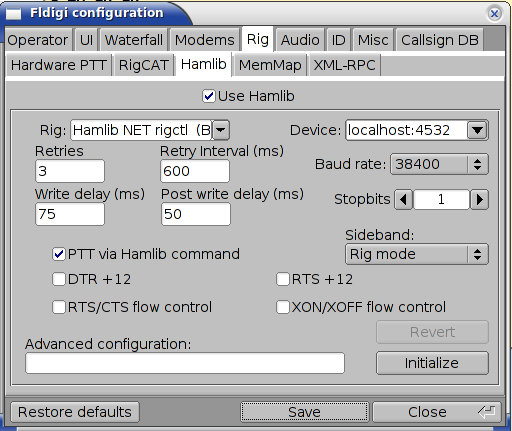
- Enter the hostname:port as the Device
- Baud rate and stop bits are set when starting rigctld--they have no effect when set from the application
Some screenshots will help explain the syntax.
Fldigi:
CQRlog:
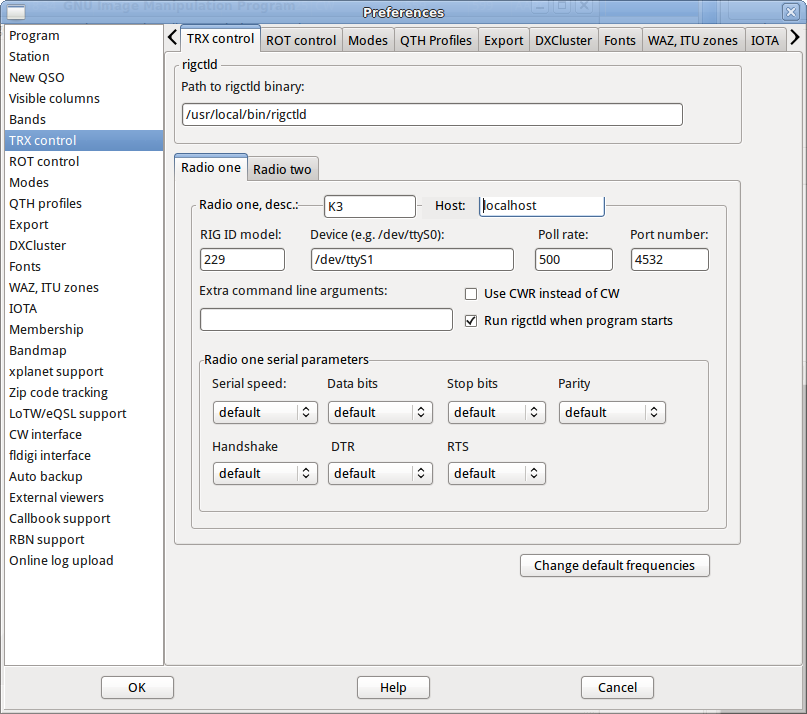
Later versions of CQRlog use rigctld for all Hamlib operations. Note that the path to the rigctld binary is explicitly set. This allows showing a locally installed version instead of one installed by the system's package manager. Two radio configurations are available as in older versions.
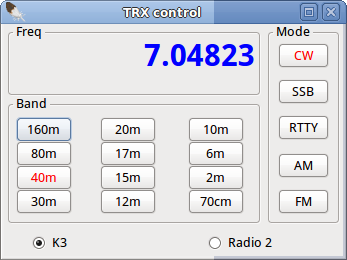
CQRlog's TRX Control window showing both available radio selections.
N.B. Some experimentation of timing parameters (if available) may be necessary to allow multiple programs to share the ctld daemon. For example, with default values Fldigi will poll very aggressively. Setting the Write delay field to some value will slow its polling. While the screen shot above was taken when I was experimenting with 75 mS, higher values may show improvement.